Malware101
Summary
My notes while learning malware development for Windows.
Note For The Reader:
These are NOT up to date “how to build super haxxor l33t 1337 malware notes/tutorials” these are simply notes on the fundamentals/references. Maybe in the future modern malware techniques will be added. Things evolve too fast for consistent notes and same with evasion techniques so don’t expect these notes to be super up to date.
Malware types
Notes:
- Sophisticated malware will be able to detect tools trying to analyze it by checking processes running or if it’s in a virtual machine.
RAT
- persistent connection to a machine to monitor things like key strokes.
Infostealers
- targets sensitive information like medical records or banking information
Droppers and loaders
- Deploy additional malware through a web request.
Ransomware
- Denies access to a person’s computer for a ransom.
Wipers
- Destroys sensitive information or entire systems.
Worms
- Self spreading malware.
Viruses
- Adds malicious code onto a host system’s files.
Rootkits and Bootkits
- Malware that conceals itself in the kernel or in the BIOS. Rootkits run at system startup while Bootkits start at boot time.
Trojans
- Pretends to be legit programs to infect a system.
Windows 101
Concepts/Essentials
User mode vs Kernel mode
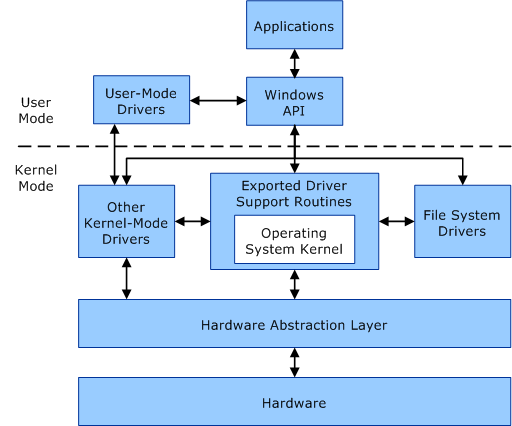
Windows API/WinAPI
- various functions for programs to interact with to function
Drivers
- Provide an abstraction layer between the actual kernel and user (kernel level anti cheats are drivers)
- Drivers can be ran in user mode or Kernel mode
- Kernel mode have FULL access to the kernel
- User mode drivers are restricted
Hardware abstraction Layer
- Interface for hardware to interact with the rest of the system.
Kernel
- Kernel is the “magic” of this system by having the utilities for everything to communicate and run (somewhat) effectively by handling memory management and other complex tasks.
Processes and Threads
- Processes are applications
- Threads are instructions for that process (processes can have more than one thread)
Objects and Handles
- Objects are resources like resources (files, tokens, another process, or thread)
- Handles are identifiers for those processes or objects a program is trying to access

- Mutexe (Mutual exclusions) control access to objects to prevent system crashes or other issues.
Windows API
- WinAPI is a library of various functions
- API helps with things from security authentication to even showing a message box
- Docs are notoriously bad
Windows Native API
- a lower level windows API
- undocumented by MS
http://undocumented.ntinternals.net/
https://www.geoffchappell.com/studies/windows/win32/ntdll/api/native.htm
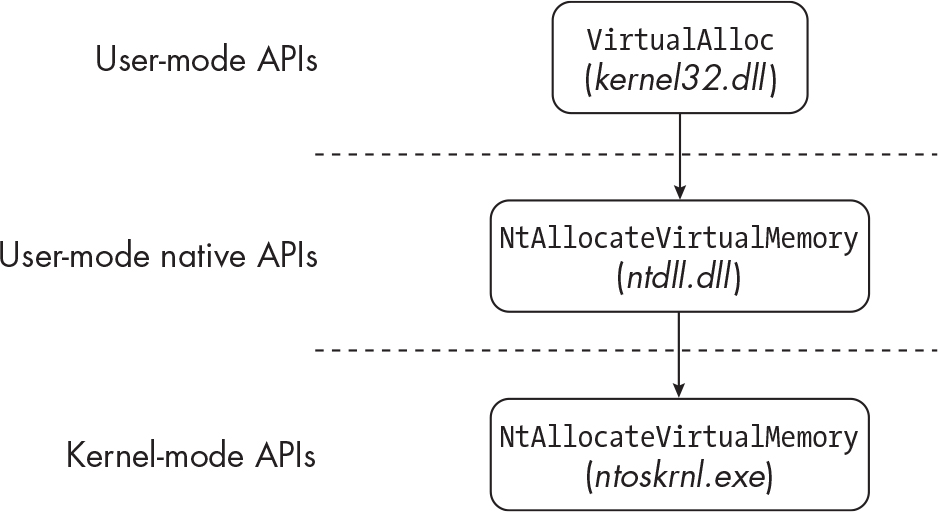
API Functions:
Notes
- API functions have various suffixes.
Exmeans newerAoutputs and inputs in ANSI format (https://ansi.tools/)Woutputs and inputs in unicode format (https://gist.github.com/jpassaro/bf400b0410810a071a7fb3509ef6c2c3)
- Native API functions have prefixes. https://stackoverflow.com/questions/4770553/windows-native-api-when-and-why-use-zw-vs-nt-prefixed-api-calls#4770583
Zware for kernel mode driversNtare for user mode applications
- DLLs are libraries that contain these functions
- kernel32.dll
- Contains fundamental user mode functions
- user32.dll
- For gui applications
- Winhttp.dll
- For internet functions for windows programs
- ntdll.dll
- Synchronization, threading and other system tasks that communicate with the kernel
- kernelbase.dll
- For backwards compatibility for windows apps
- kernel32.dll
Process Internals
Processes point to additional data structures. It provides additional information for windows to understand and manage processes
EPROCESS Structure
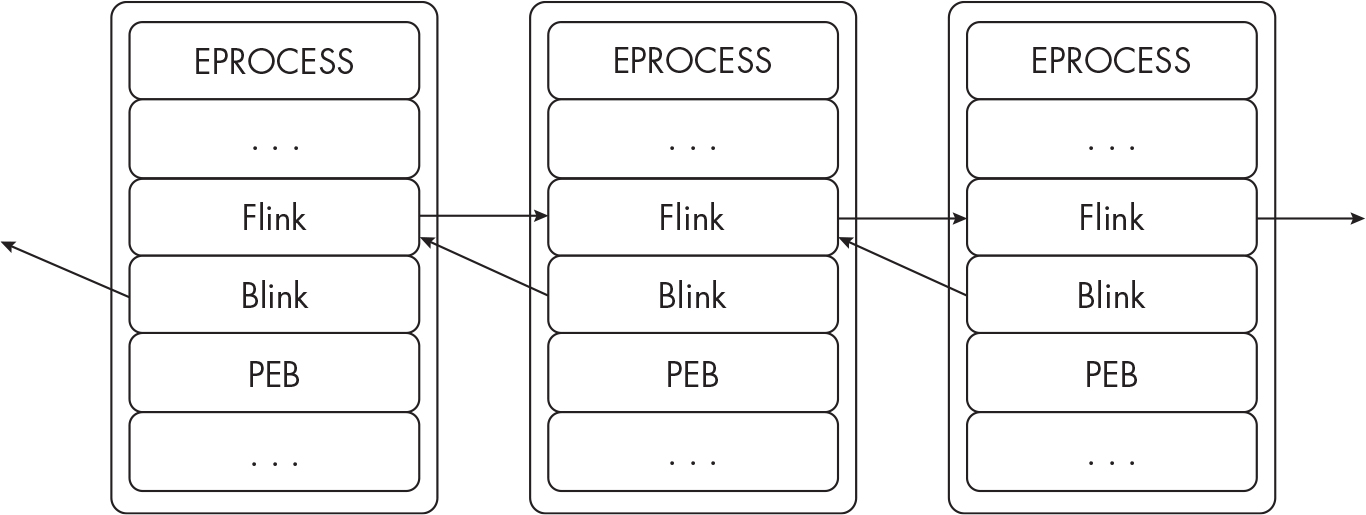
- This is how windows processes are understood by the kernel.
- EPROCESS structures:
- PEB (process environment block)
- contains essential information for the process
- Forward Links (Flink)
- chains to the Blink
- Backward Links (Blink)
- links backwards to the Flink
- Links just link processes
- PEB (process environment block)
PEB Structure Offsets and Data
| Offset (x86) | Offset (x64) | Data |
|---|---|---|
| 0x002 | 0x002 | Stores the BeingDebugged value, which indicates whether the process is running under the context of a debugger. |
| 0x008 | 0x10 | Stores the base address of the process executable in memory. |
| 0x00C | 0x18 | Stores information on the modules and libraries the process has loaded. |
| 0x018 | 0x30 | Stores information about the process’s memory heap. |
| 0x064 | 0xB8 | Stores the NumberOfProcessors value, which indicates the number of processors the system has. |
TEB (Thread Environment Block aka TIB Thread Information Block)
- Contains Information for process’s running threads
| Offset (x86) | Offset (x64) | Data |
|---|---|---|
| FS:[0x00] | GS:[0x00] | Stores the current structured exception handler (SEH) frame. |
| FS:[0x04] | GS:[0x08] | Points to the base of the thread’s stack. |
| FS:[0x18] | GS:[0x30] | Points to the TEB itself. |
| FS:[0x20] | GS:[0x40] | Stores the process ID (PID) of the thread’s owning process. |
| FS:[0x24] | GS:[0x48] | Stores the thread ID (TID) of the current thread. |
| FS:[0x30] | GS:[0x60] | Points to the PEB of the thread’s owning process. |
| FS:[0xE10] | GS:[0x1480] | Points to thread-local storage (TLS) information. |
Stacks and Heaps
- Stack is where temporary data is stored (destroyed after a thread is done)
- Heap is a large region used to dynamically store memory at runtime (global variables, etc.)
Virtual Memory
- In windows processes have virtual memory allocated to them that are mapped to the RAM
- Solves process interference or programs crashing
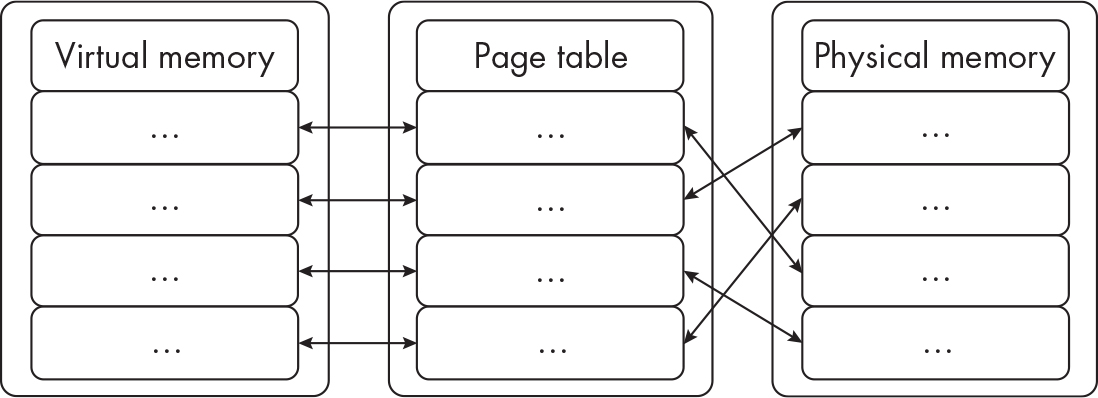
- If a process has too little RAM for a process it’ll page/store it on disk (like a Linux swapfile or partition)
PE Files
- Essentially the windows version of
elffiles - Contain headers and sections
- Headers are metadata
- DOS Headers are for older versions of windows
- PE header contains information used by the Windows PE Loader
- Section header contains metadata related to file sections (size, address, etc.)
- Common sections in table bellow
| Section | Description |
|---|---|
| .text | The file’s main executable code |
| .rdata | Read-only data, such as static variables and constants |
| .bss | Uninitialized data, such as variables that haven’t been assigned a value yet |
| .data | Variables not embedded in the .rdata and .bss sections, such as global variables |
| .rsrc | Assets that will be loaded by the executable at runtime, such as images, fonts, and other supporting files |
| .idata | The imports address table* information about imports used by the PE file |
| .edata | The exports address table* information about exports used by the PE file |
PE Loading Process
- Windows makes a new EPROCESS structure
- Windows allocates virtual memory to the process
- PE Loader reads and parses the DOS, PE, and optional headers
- PE Parses all the other headers
- Loads libraries associated with the PE (
.idataand or.rdata) - New thread is created inside the process (
.textsection)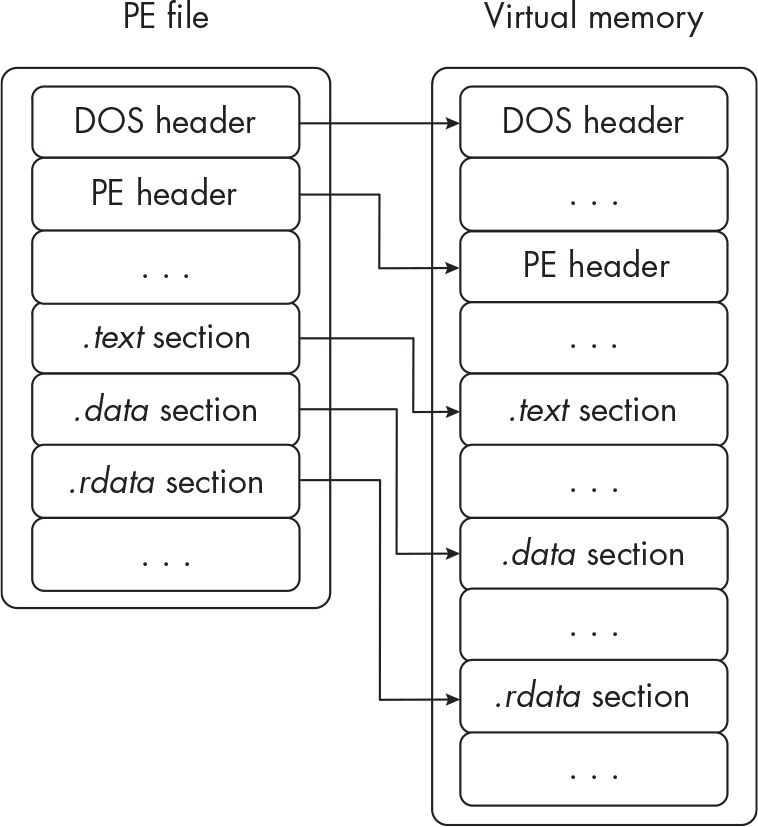
Address Space Layout Randomization (ASLR)
- prevents memory corruption
Registry
- A database that applications and the OS reads and stores configurations
Hives
- HKEY_LOCAL_MACHINE (HKLM)
- Low level OS
- Hardware configurations
- Security Policies
- Account settings
- Settings for software installed
- SAM database
- LSA Secrets
- HKEY_CURRENT_USER (HKCU)
- user and system configurations
- HKEY_USERS (HKU)
- User settings
- Stores the information for every user on the system
- Sub keys represent identifiers of every user
- HKEY_CURRENT_CONFIG (HKCC)
- Pointers to the
HKLMkey for hardware profiles
- Pointers to the
- HKEY_CLASSES_ROOT (HKCR)
- registered application information like default apps to open files
Evasion techniques
Process Injection
- Injecting code into another process
- Mimics normal behavior like injecting into a web browser to communicate with a C2 server
- prevents debugging
- privilege escalation, certain processes can elevate privileges
- intercepting data from a hook, this allows for modifying API calls or getting sensitive data.
Random vs Target Process
- Depending on injecting into a specific process or a random one is goals.
- Targeting specific processes can help with evasion while random ones can trip defenses
- Self-injecting is injecting into its own process, typically during unpacking.
Shellcode Injection
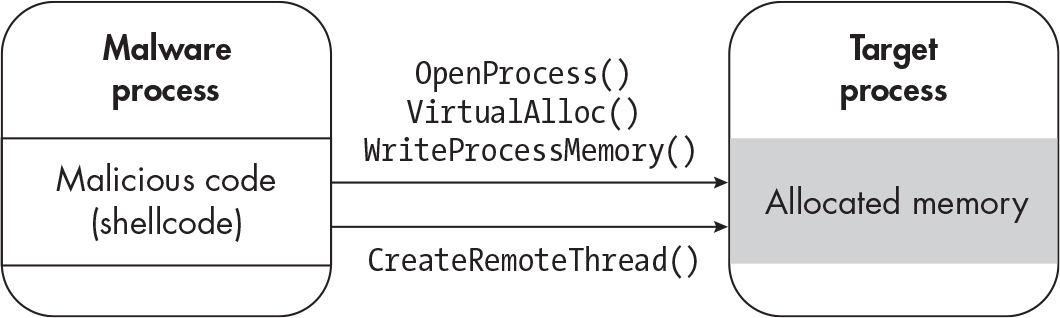
- shellcode injection happens by injecting shell code into a process.
- call
OpenProcess/NtOpenProcessto open a process and specify the proper options - After getting the object handle run either
VirtualAlloc,VirtualAllocEx, orNtAllocateVirtualMemoryto allocate enough memory for your shellcode. - Write the memory to the process with
WriteProcessMemoryorNtWriteVirtualMemory - Call
CreateRemoteThread,NtCreateThreadExorRtlCreateUserThreadand input the proper options.
Example:
// src/main.zig
const std = @import("std"); // standard library
const processThreadsAPI = @cImport({
    @cInclude("processthreadsapi.h"); // import windows libraries
    });
const memoryAPI = @cImport({
    @cInclude("memoryapi.h"); // import windows libraries
});
const win = @cImport({
    @cInclude("windows.h"); // import windows libraries
});
const syncHAPI = @cImport({
    @cInclude("synchapi.h"); // import windows libraries
});


const shellCode = [_]u8{ // return 1
    0xb8, 0x01, 0x00, 0x00, 0x00,  // mov eax, 1
    0xc3                            // ret
};
pub fn main() !void {
    const currentProcess = processThreadsAPI.GetCurrentProcess(); // grab the current process
    if (currentProcess == null) {
        return error.currentProcessFailed;
    }

    const addr = memoryAPI.VirtualAlloc( // allocate virtual memory
        null,
        shellCode.len,
        memoryAPI.MEM_COMMIT,
        memoryAPI.PAGE_EXECUTE_READWRITE
    );

    if (addr == null) {
        return error.VirtualAllocFailed;
    }
    var bytesWritten: win.SIZE_T = 0; // set the bytes written to 0

    const result = memoryAPI.WriteProcessMemory(
        currentProcess,
        addr,
        &shellCode,
        shellCode.len,
        &bytesWritten
    ); // write the virtual memory
    if (result == 0) {
        std.debug.print("unable to write memory!", .{});
        return error.WriteFailed;
    }

    const threadHandle = processThreadsAPI.CreateRemoteThread(
        currentProcess,
        null,
        0,
        @ptrCast(addr),
        null,
        0,
        null,
    ); // grab and create a new thread handle
    if (threadHandle == null) {
        return error.CreateRemoteThreadFailed;
    }
    const threadResult = syncHAPI.WaitForSingleObject(
        threadHandle,
        win.INFINITE,
    ); // wait for the thread to finish
    std.debug.print("thread result: {}\n", .{threadResult}); // debugging


    var exitCode: win.DWORD = 0;
    _ = win.GetExitCodeThread(threadHandle, &exitCode); // get the exit code
    std.debug.print("Thread code: {}!\n", .{exitCode});  // debugging

}
DLL Injection
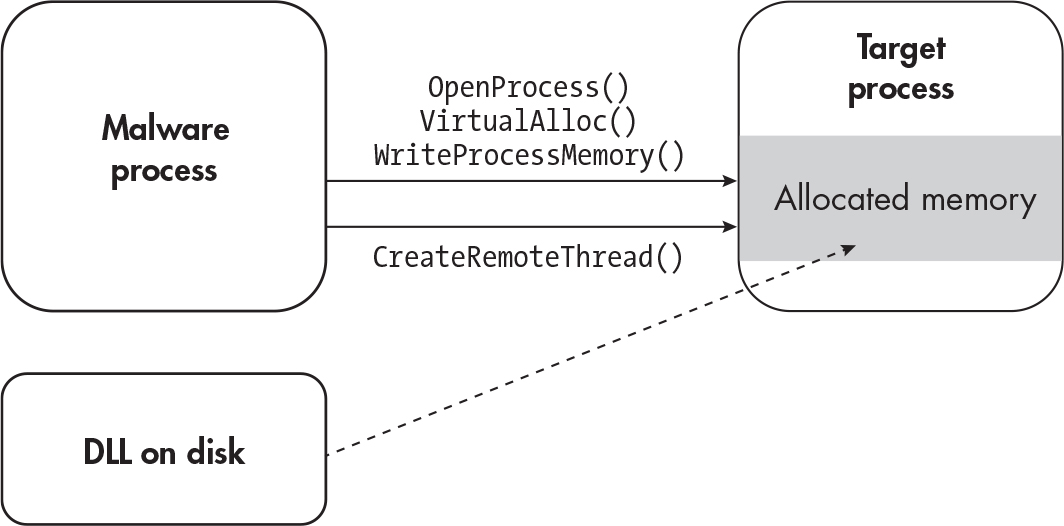
- Common form of process injection by using libraries to inject code once it’s loaded
- add malicious DLL to disk
- call
OpenProcess/NtOpenProcessto open a process and specify the proper options - After getting the object handle run either
VirtualAlloc,VirtualAllocEx, orNtAllocateVirtualMemoryto allocate enough memory. WriteProcessMemoryorNtWriteVirtualMemoryto write the location of the DLL.- Call
CreateRemoteThread,NtCreateThreadExorRtlCreateUserThreadand input the proper options to get the process to read the DLL withLoadLibrary.
Reflective DLL Injection
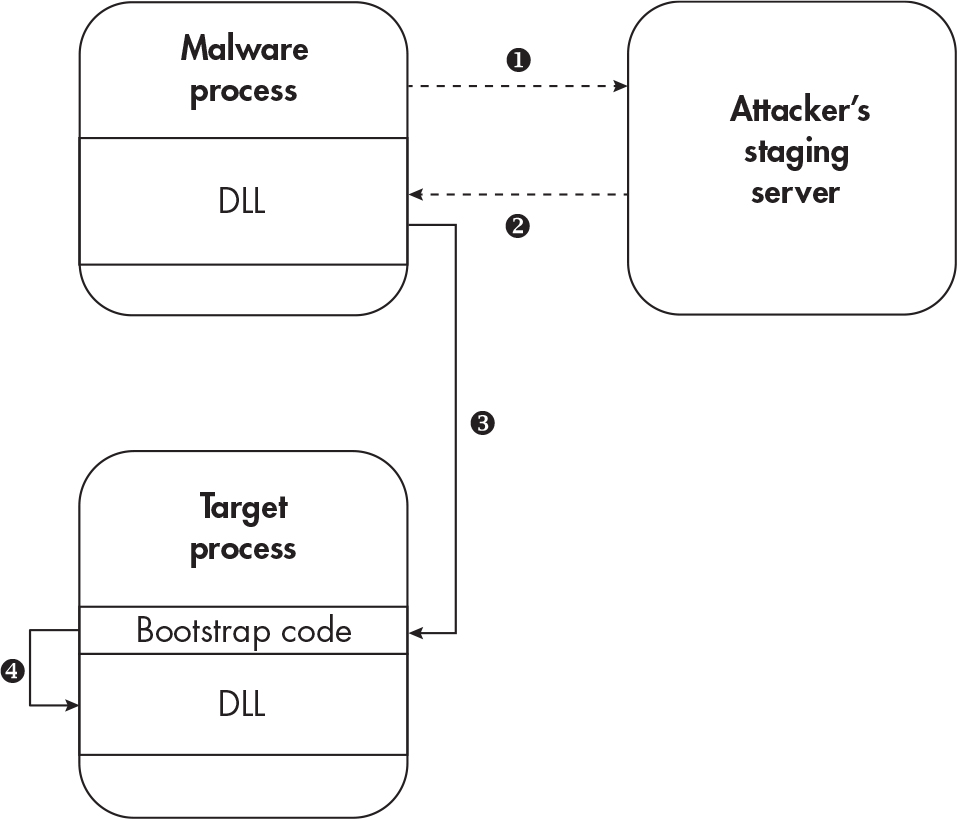
- DLLs are injected through being stored in memory instead of on the disk
- Write the DLL to the memory and transfer the control flow into the new injected DLL.
- example
Process Hollowing/RunPE
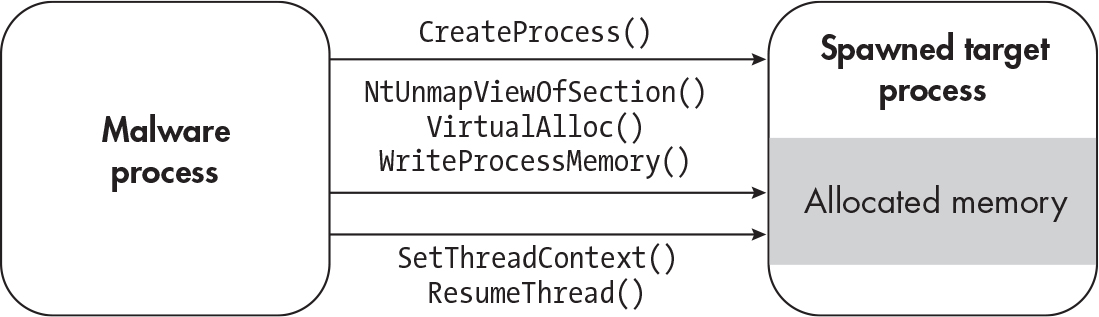
- Un-maps code from a target’s process memory
- Doesn’t use an arbitrary remote process, starts a new process instead.
- Create a new process with
CreateProcess(CreateProcessAorCreateProcessW) with the flagCREATE_SUSPENDEDor0x00000004 - Unmap the process’s code with
NtUnmapViewOfSection - Allocate memory for the new region with
VirtualAlloc - write the payload with
WriteProcessMemory - use
SetThreadContextandResumeThreadto point the thread to the new injected code and to resume thread execution.
Thread Hijacking
- Opening a new thread within a target process to run code.
- Similar to Process Hollowing
- call
OpenThreadand specify the thread ID to open - call
SuspendThreadorWow64SuspendThreadto suspend the thread. - use
VirtualAllocto allocate memory - Write the new memory with
WriteProcessMemory - call
SetThreadContextandResumeThreadto set control flow and resume the thread to run the new code.
APC Injection/Asynchronous procedure call
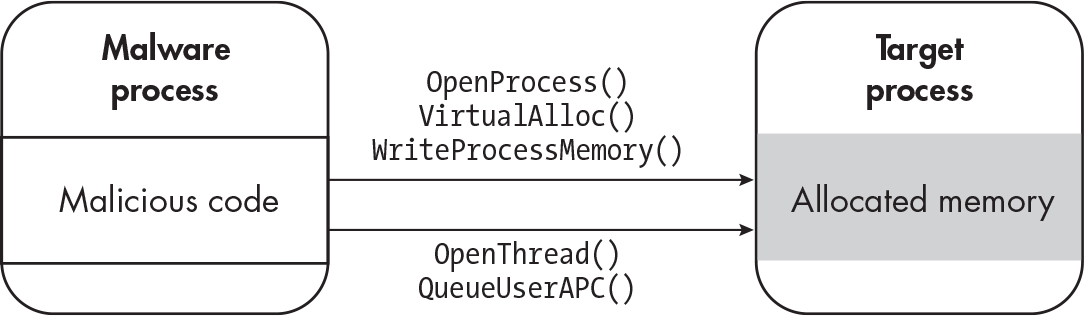
- Allows for tasks to be queued and executed in the context of a thread.
- Write code to the target process normally
- Open a thread with
OpenThread - Then Queue a new APC task with
QueueUserAPCorNtQueueApcThread - Resume the process normally to then execute the new APC thread.
Atom Bombing
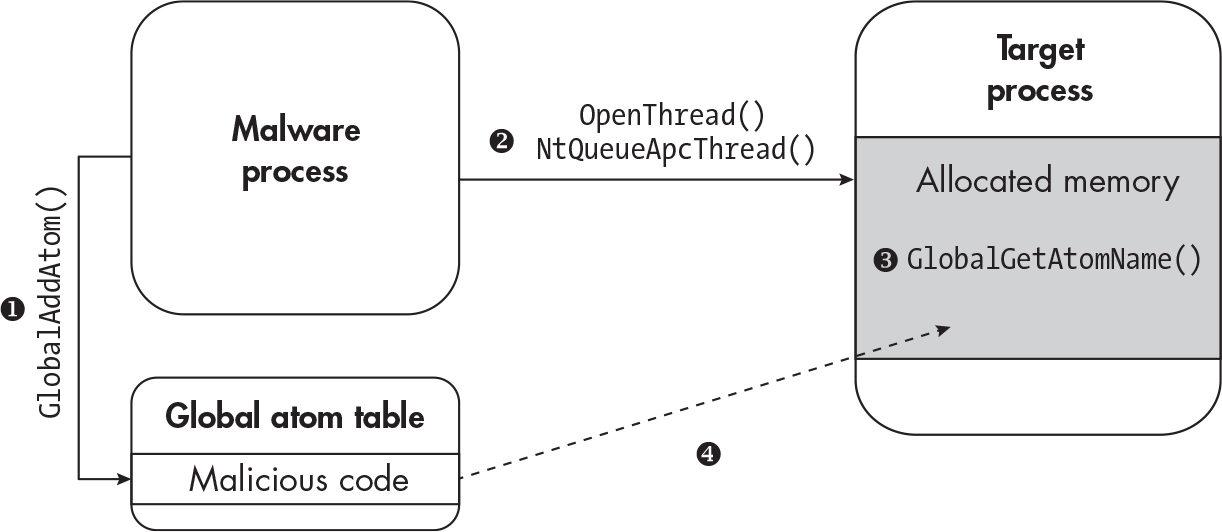
- Shares similarities to APC injection but involves “Atoms” (functions and definitions related are in the #Terms 101 section)
- Create a new global Atom with
GlobalAddAtom(there are other functions than this one) - Start the APC queue with
NtQueueApcThreadto force the process to do step 3. - get the Atom with
GlobalGetAtomName(there are other functions than this one) - Process now is storing the shellcode or malicious code.
Process image manipulation
- tampering process images and windows handles for processes
- abuses both process creation and how anti-malware and endpoint protection operates
PsSetCreateProcessNotifyRoutineExis invoked whenever a new process is created to notify the anti-malware.
Normal windows process creation
- This is how windows normally creates processes
- Handle is obtained
- Calls
NtCreateSectionto map an object in memory - Calls
NtCreateProcessExwith referencing the new object in memory. - Run the process using
NtCreateThreadEx
Process Herpaderping
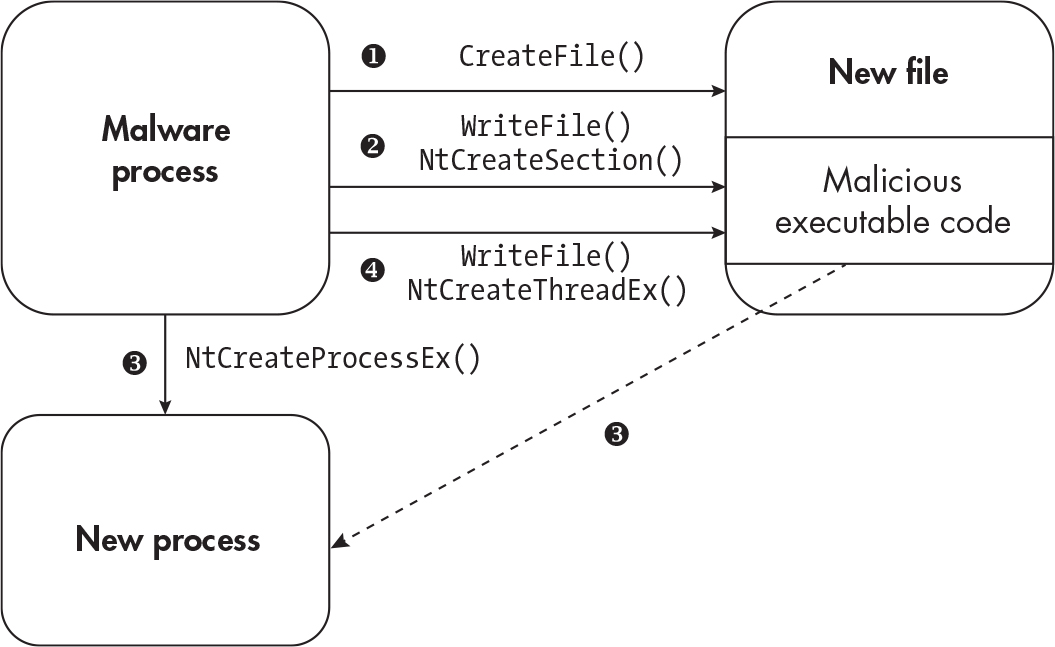
- Interferes with the way windows creates processes.
- Creates an empty file with
CreateFile - Write data to file with
WriteFileand create a section withNtCreateSection - Create a process using the section object with
NtCreateProcessEx - Remove the malicious code in the file with
WriteFileand start a new thread withNtCreateThreadExpointing to the section in memory.
Process Doppelganging
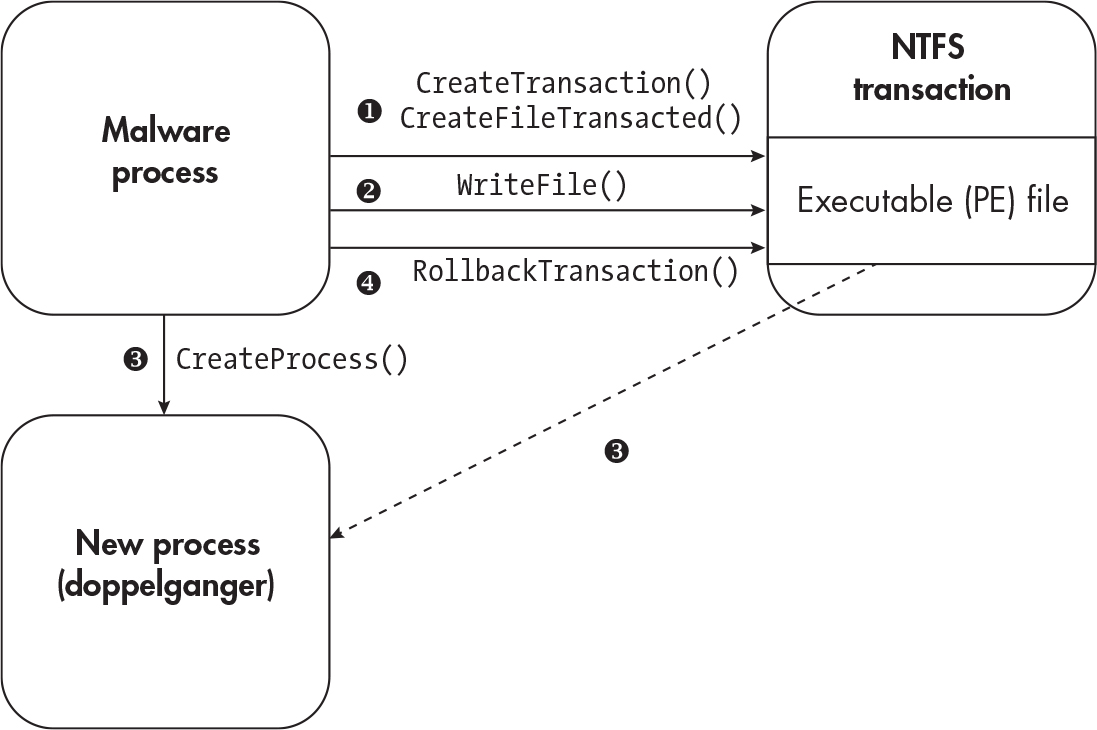
- uses transactional NTFS to hide
- New files created with transactions can’t be accessed from outside the process.
- Resource: https://www.malwarebytes.com/blog/news/2018/08/process-doppelganging-meets-process-hollowing_osiris
- After it’s done executing it can roll back the transaction
CreateTransactionis called and open an existing executable file withCreateFileTransactedor use lower level functions likeZwCreateTransaction,RtlSetCurrentTransaction, orZwCreateFile- write to a file with
WriteFile - create a new process with
CreateProcessorNtCreateProcess - After mapping to memory call
RollbackTransaction
Process Reimaging and Ghosting
Process Reimaging
- Like Doppelganging it manipulates the current running process.
- To remimage the process modify the
FILE_OBJECTwhich describes the filepath on disk and point it to a legitimate executable like internet explorer - Resource: https://github.com/djhohnstein/ProcessReimaging
Process Ghosting
- Like process herpaderping malware would create a file, map the file to memory then delete it.
- Resource: https://www.elastic.co/blog/process-ghosting-a-new-executable-image-tampering-attack
- Windows prevents endpoint protection from reading deleted files but the it’ll still execute because it’s in memory.
DLL Hijacking
- All windows apps need DLLs
- If a program doesn’t validate the DLL being loaded it’s possible to force a program to use your own to execute code.
Shim Hijacking
- This abuses the backwards compatibility for windows called “Shimming”
- Developers use “shims” to patch code.
- Malware can use the shim “InjectDLL” to inject a malicious DLL into a shimmed app.
- Resource: https://www.hackingarticles.in/windows-persistence-using-application-shimming/
Hooking
- Hooking is hooking into memory space to intercept api calls
SetWindowsHookEx
- Allows for a specific windows event to be hooked
- takes in a DLL file as an argument
Inline Hooking
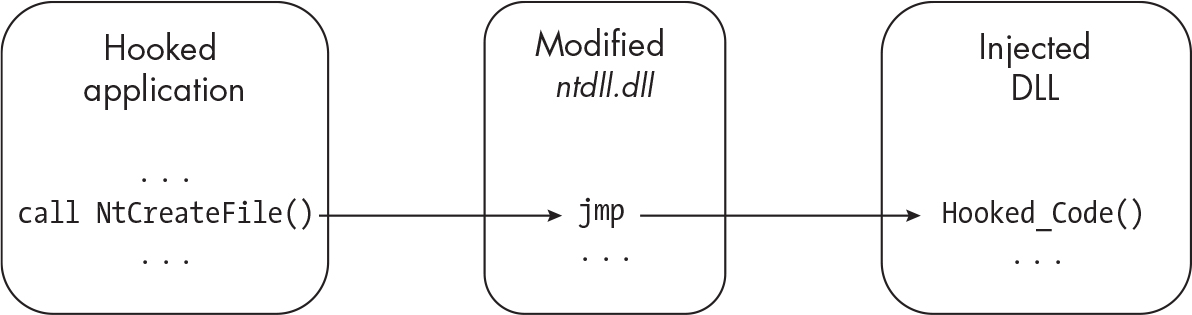
- Injects code into a target process and modifies the function being hooked.
- reinstalling the previous function is recommended to prevent tripping endpoint protection
- Jumping back to the original function is called a “Trampoline”.
Windows Rootkits
Terms 101
Shellcode: code that executes regardless of where it is in memory (https://medium.com/@yua.mikanana19/position-independent-code-pic-and-shellcode-an-introduction-1ea71f707ad)
Malware analysis: analyze malware behavior and signatures to identify the threat actor(s).
EDR(endpoint detection and response): A stack of software for protecting endpoints like domain controllers or critical infrastructure.
XDR(extended detection and response): A stack of software like an EDR but offers more detection, data sources, and security tools.
DKOM: Direct kernel object modification
DCOM: Distributed component object model extends COM objects for remote procedure calls and references
COM: component object model is for allowing applications to share and distribute data regardless of programming language
Atoms: specific pieces of data like strings, stored in a structure called an “Atom Table”, used in communication between processes to coordinate actions.
Atom Table: A table of Atoms that can be global (
GlobalAddAtom, there are other functions than this one) or local (AddAtom, there are other functions than this one).Transactional NTFS: A feature in windows to help with error handling and to help preserve file integrity, tracks changes to the file system.
DLL: dynamic link library, all windows programs need libraries to function.